AutoRecords 1.2
Version 1.2.2 Release Notes
- AutoClassification Rules Renamed To Policies - This change was made to better align terminology within AutoRecords with how end users are implementing it. This makes conceptualizing how to implement AutoRecords easier for new users as well.
- Logging & Task Queue Improvements - As M-Files has enhanced their logging capabilities, AutoRecords has been updated to include several logging changes which make it much easier to access and review logs especially in the cloud. Logs can now be created as a multi-file document in M-Files in addition to being available in the Windows Event Viewer. Additionally logging levels have been added so logging can be used to get timing of each step or full debugging. Running AutoRecords with Logs set to show the Timing for each Step can be important for optimizing task queue settings.
- Disposition Log (Certificate Of Destruction) - A new feature has been added to generate a separate log file which lists Disposition Actions that have occurred. This log file can be used as a "certificate of destruction" in place of the Action objects.
- Direct Actions - This new feature was added to Event Templates to allow AutoRecords to perform certain Actions in M-Files without creating an Action Object. This results in faster execution. On an Event Template there is now a checkbox which allows you to Use Direct Actions. If checked, a drop down appears allow you to select from Delete & Destroy, Destroy File Version, Flag As Obsolete, Restrict Access To RM's, Set Archive Flag or Set Delete Flag. Actions requiring assignment still require the Action object to be created so there is an object that can be assigned.
- Assign To Policy Owner - Policies (formerly AutoClassification Rules) now have the ability to create an assignment for a Policy Owner. Since Retention Categories are often shared across departments (i.e. Delete 10 Years After Obsolete), there was a need for an assignment to be created based on the Policy rather than the Retention Cateogry.
- Last Modified By AutoRecords - AutoRecords now uses a property called Last Modified By AutoRecords to determine when it last processed an object. This is used instead of relying on the M-Files Status Changed or Last Modified properties and eliminates unnecessary processing in some instances. It also cleans up some edge cases that occur when clients have added their own vault applications which affect the Last Modified date.
- Configuration For "Updates Impact Last Modified Date" - AutoRecords previously always updated objects in a way that did not impact the Last Modified date/time of the object. While this is useful in many cases, it is also time consuming when processing which can be detrimental when updating large numbers of objects (i.e. AutoRecords runs once a year and updates 500,000 objects). This configuration provides the ability to turn off this feature and speed up processing. This is primarily useful for very large sets of data in specific situations where the Last Modified date is not critical for retention or business processes.
- Processing Speed Enhancements - Several speed enhancements were made in Step 2 and in cases where the Last Run Date was cleared.
- Bugs:
- Null reference exception - this error occurred when Triggers were updated on existing configurations which prevented the change from being fully executed.
- Event deletion and status time filtering - Events were being left on the system when Action Retentioned Objected was checked.
- Overwriting Events - Policies (previously AutoClassification Rules) were reprocessing and overwriting Events unnecessarily.
Version 1.2.1.8 Release Notes
-
Indirect Date Triggers - Indirect Date Triggers have been added to allow processing on Date properties based on the value of dates that are set on related objects. They operate just as standard Date Triggers but support Indirect Retention of objects based on object relationships. For example a Project Completion Date that is in the future or past can now be used to drive retention of documents related to the Project.
-
Action Retentioned Object Default Value - On Indirect Triggers this property determines whether the "parent" retentioned object should be processed as well as the "child" objects. For example, if there's a Project and all related documents and objects are being removed, this property determines whether the Project also be removed. Previously, if the value was not specified, it defaulted to Yes. It now defaults to No when not specified.
Version 1.2 Release Notes
-
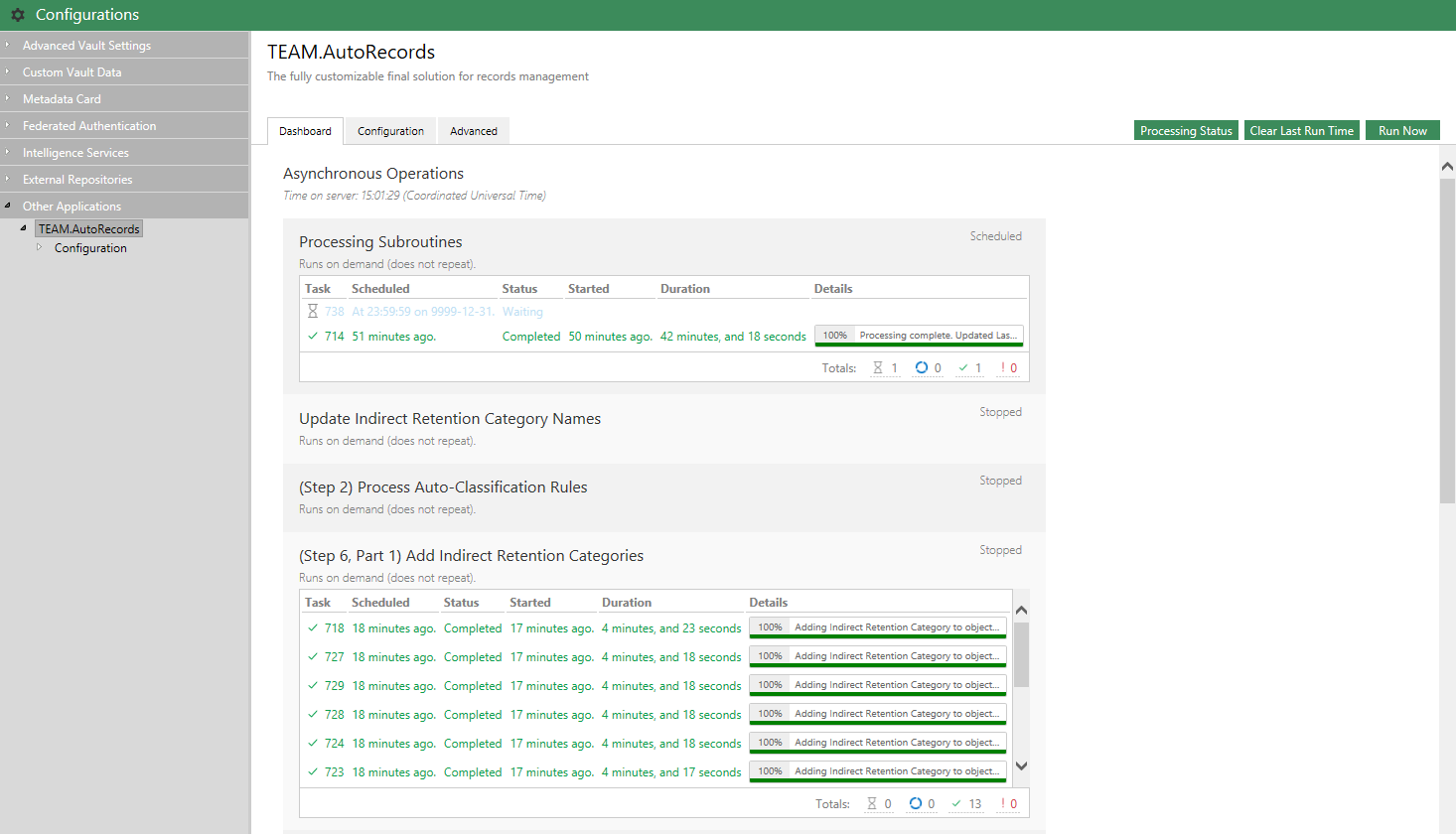
Administration Utility Dashboards - AutoRecords leverages the newly released dashboarding capabilities in the M-Files Administration Utility. The AutoRecords processes can now be monitored in real time using the dashboard found in the System Admininistration Utility for your vault under Configuration | Other Applications | Team.AutoRecords which is especially helpful for those using the M-Files Cloud environment where access to server logs is restricted.
-
Performance Improvements - Expanded the use of M-Files Task Queue functionality to run more processes concurrently which helps with performance in certain situations.
-
Indirect Trigger Filters - Added the ability to specify classes an Indirect Trigger can be applied to. This makes configuration of AutoRecords more convenient in cases where various classes of content related to a parent item must be handled differently. For example, if there is a Project and certain classes of documents related to the Project must be retained for five years after the project is complete while others must be retained for 7 years after the project is complete, previously separate configurations had to be created for every document class. With this release multiple classes can be specified on an Indirect Trigger making this use case much easier to configure.
-
Support for UIX Fast Browsing has been added.