Construction Management
Construction Management Overview
Construction Management consists of modules to facilitate the Bid and Package Management processes. There are several components that are shared across the modules and they are outlined below.
- Organizations
- Trades
- Contacts
- Employees
- M-Connect Users
- Projects
Organizations
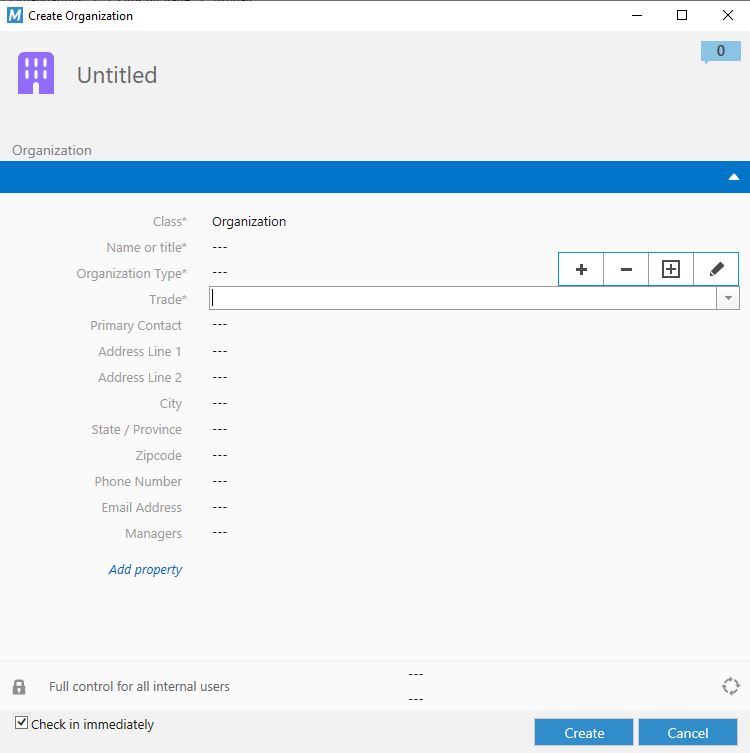
Organizations are central to Construction Management as Bids and Packages must have Organizations assigned to them. Creating an Organization is done using standard M-Files functionality to create objects. The information for the Organization is shown below:
- Required Properties
- Name or title
- The Name of the Organization. This will be referenced by notification emails and templates such as cover sheets.
- Organization Type
- This is a multi-select property which determines whether an Organization can participate in Bids, Packages, or both.
- Trade
- Identifies the types of work the Organization performs.
- The intention of Trade is to enable custom views and selections as needed based on Trade.
- Identifies the types of work the Organization performs.
- Name or title
- Optional Properties - The remaining properties are used informationally and are not tied to specific functionality.
Trade
A Trade is meant to define specialized skills a particular subcontractor has capabilities for. Creating a Trade is done using standard M-Files functionality to create objects. The only information for the Trade by default is just the Name. The list of Trades will grow over time as you define skills.
Contacts
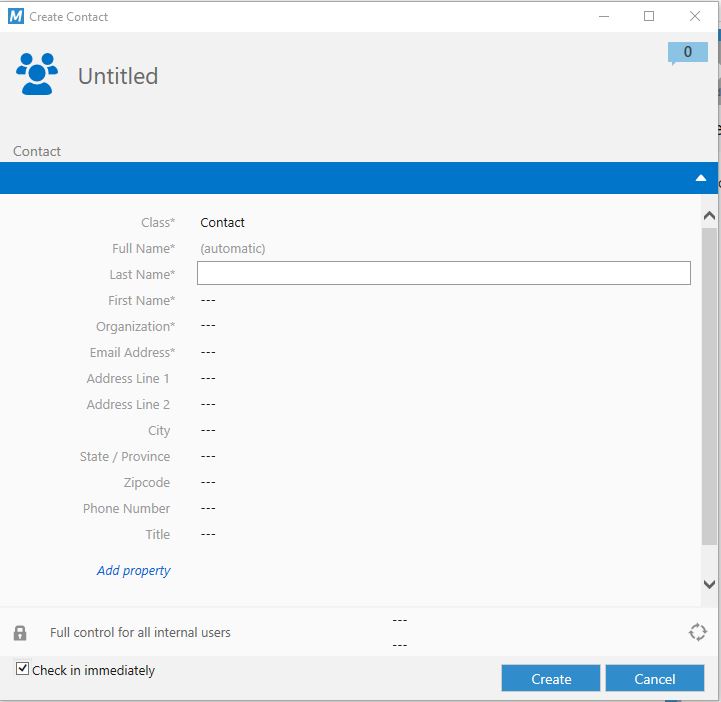
Contact objects are intended for persons external to the business, are associated to Organizations, and are very important to the Bid and Package Management process. A Contact is responsible for completing Bid & Package Management activities within the M-Connect Portal. Note: Only Contacts who have had an M-Connect User created for them will be able to process Bids and Packages. See Create M-Connect User.
- Required Properties
- Full Name
- The Full Name will be created automatically from the First Name and Last Name properties.
- Last Name
- The contacts last name. Used in sending Notifications.
- First Name
- The contacts first name. Used in sending Notifications.
- Organization
- The Organization that this Contact belongs to. This determines the information they are limited to when they log into the M-Connect Portal, and also which Bids and Packages the Contact can be associated with.
- E-Mail Address
- The email address for the contact. This will be used for sending notifications as well as logging into the M-Connect Portal. See Create M-Connect User below for information on how the email is used.
- Full Name
- Optional Properties - The remaining properties are used informationally and are not tied to specific functionality.
Employees
Employee objects are intended for persons internal to the business. M-Files is often configured such that Employee objects are created and configured based on records and information pulled directly from Microsoft Azure. This connection is handled through the M-Connect Identity Manager.
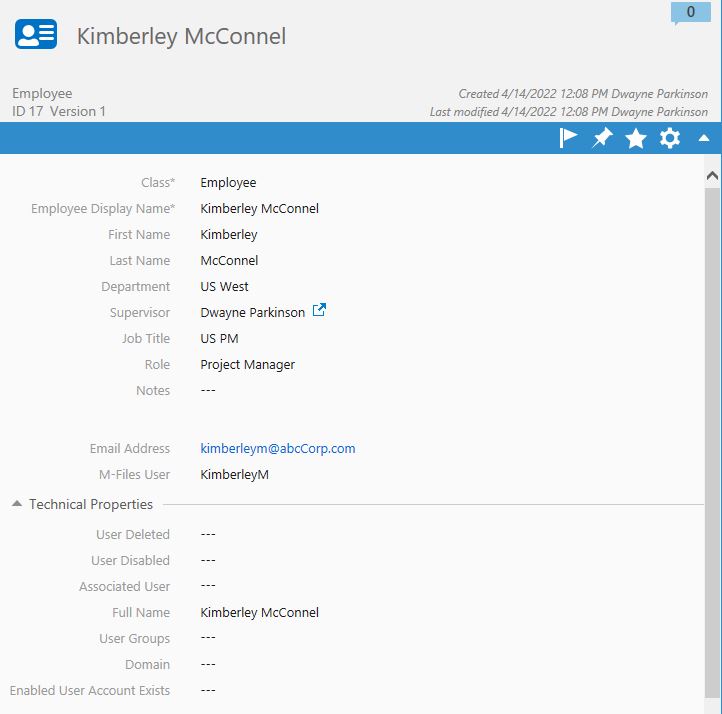
The Employee object provides information beyond the M-Files User profile. This is useful for some Bid Management functions such as providing details on notifications. Employees can be created using the standard M-Files Create functions. Details about the Employee are shown below:
- Employee Information
- Employee Display Name
- This property is set automatically as a combination of Firt Name and Last Name.
- First Name
- Employee First Name. By default this is used in some of the notifications sent to subcontractors.
- Last Name
- Employee Last Name. By default this is used in some of the notifications sent to subcontractors.
- Department
- The Department the Employee works in. For reference purposes only.
- Supervisor
- The Supervisor of the Employee. For reference purposes only.
- Job Title
- The title of the Employee. For reference purposes only.
- Role
- Choose from the list of available Roles. The Roles are configured in the M-Files Administrator Utility.
- Notes
- Free form text field for notes about the employee. For reference purposes only.
- EMail Address
- The e-mail address of the employee.
- M-Files User
- Select the M-Files user to associate to this Employee.
- Employee Display Name
- Technical Properties - These properties can and should be set by the system but are avialable for editing in the event there are any issues with user credentials. These properties are used by the M-Connect portal and outlined in more detail in the M-Connect Portal documentation.
Create M-Connect User
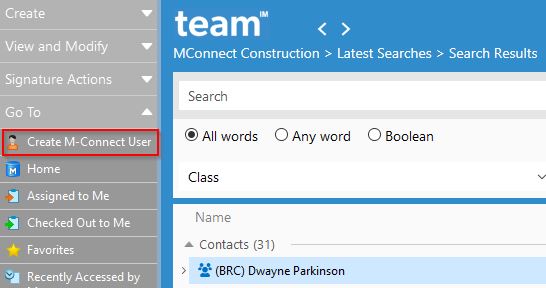
An M-Connect User object is created and then is attached to either Contact objects Employee objects. This grants permissions and stores information needed for those Contacts and Employees to access the M-Connect Portal. Creating an M-Connect User is done by highlighting the Contact or Employee object and then selecting the Create M-Connect User action menu item:
The M-Connect User object contains properties for M-Connect File Shares as well as the M-Connect Portal. Using the Action menu item automatically fills in most required properties. For information on all of these properties, please reference the M-Connect Identity Manager.
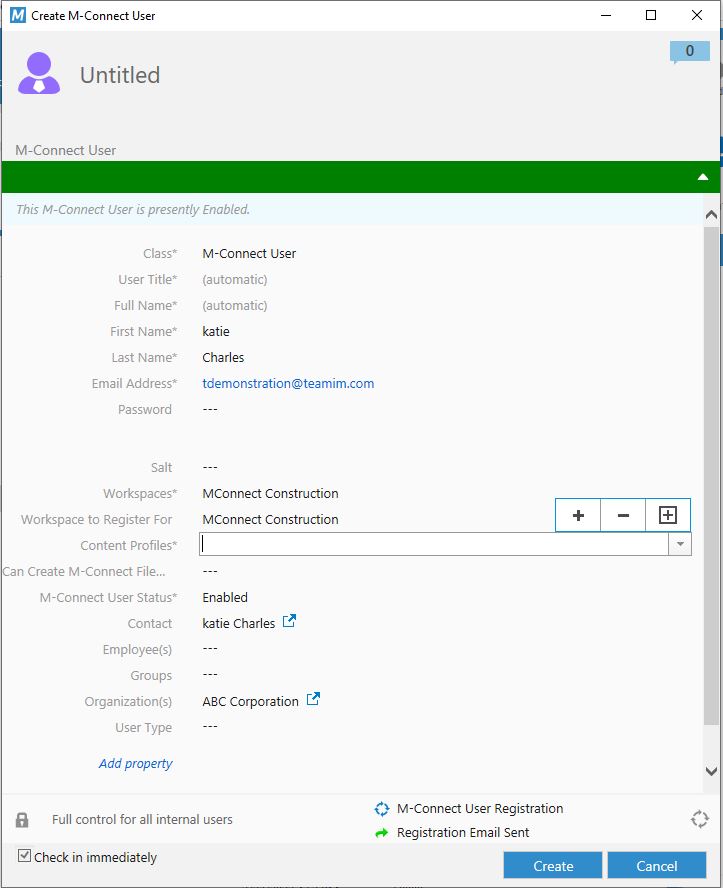
- Required Properties - These properties are necessary for the Bid and Package Management modules.
- Workspace
- Select from the available workspaces based on whether this user will access Bids, Packages, or both. If no workspaces are listed, contact the System Administrator and have them synchronize the M-Connect Workspaces.
- Organization(s)
- Select the Organization that this M-Connect User belongs to.
- Workspace
- Optional Properties - All remaining properties are primarily used as reference and are not tied to specific functionality.
Projects
Projects are M-Files objects which contain information that is critical to the Construction Managment modules. By default the Project contains a small set of properties used by Construction Management with the intention that the Project will be expanded to include properties that are important to the organization and internal business workflows as needed.
Only members of the Construction Project Manager group are allowed to create, update and Delete Projects.
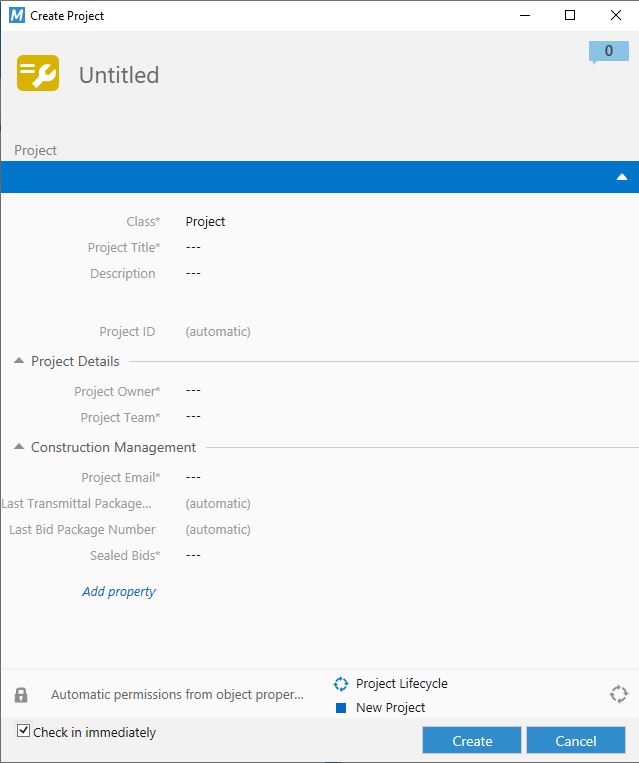
Each metadata property on the project defined below.
- Project Information
- Project Title
- This is the title of the Project. It will be used throughout the system including identification within each module and notifications sent to subcontractors.
- Description
- A short description of the Project. By default this description is not used in the system, however M-Files Templates and the M-Connect Portal can be used to surface this value in various ways.
- Project ID
- This is the unique identifier associated to the Project. It is an incrementing number that is automatically set by the system.
- Project Title
- Project Details
- Project Owner
- The Project Owner is the person who will be responsible for the Project and the only user who can delete Bids and Packages. This property is not referenced otherwise within the Construction Management modules, but can be added to Project Information in the M-Connect Portal as well as Notification Templates.
- Project Team
- These are M-Files users who will be working on the Project. For anyone to be listed as an owner of a Bid or Package they must first be a Team Member.
- Note: The Project Team is granted permission to all Bids and Packages related to the project, and only Project Team members can own Bids or Packages related to the project.
- These are M-Files users who will be working on the Project. For anyone to be listed as an owner of a Bid or Package they must first be a Team Member.
- Project Owner
- Construction Management
- Project Email
- The Project Email is used for the "From" email address for notification sent on behalf of this project. This email must be a valid email address on the organizations Azure server.
- Last Construction Package
- This number tracks Packages within the Project. It is a simple incrementing number.
- Last Bid Number
- This number tracks Bids within the Project. It is a simple incrementing number.
- Sealed Bids
- This Yes/No value is used as a default value for Bids that are created for this Project.
- Project Email
Project Documents
Any document uploaded to M-Files tagged with the Project property is by nature a 'Project Document'. The Project property can be added using the M-Files "Add Property" function on the metadata card or the Document classes can be configured in the Administration Utility to include the Project property by default.
See the M-Files User Guide. for more information on adding properties and configuring Document classes.