Actions and Action Templates
Overview
AutoRecords uses Actions to do all work on the system. It comes with a set of pre-defined Actions that are most commonly used by records managers. When AutoRecords schedules an Event on the system to perform some work, that Event will execute one or more Action(s). Importantly, there are two types of Actions within AutoRecords. Direct Actions represent Actions that are taken directly against a file or object such as Delete & Destroy Metadata or Archive. Workflow Actions include all of the functionality of Direct Actions plus the ability to perform Assignments. Workflow Actions create an Action object on the system, send that object through workflow and execute the specified Action(s) using M-Files workflow. Importantly, Workflow Actions can be extended via Action Templates to include any workflow that the organization wants to develop.
Predefined Direct Actions & Action Templates
AutoRecords includes several standard Actions that are commonly used by Records Managers. The Actions are used when creating new Event Templates and tell AutoRecords what it is supposed to do. There are two types of Actions: Direct Actions and Workflow Actions.
Action Templates
An AutoRecords Action Template is used to determine which M-Files workflows will be used to perform AutoRecords Actions. The Action Template is used by AutoRecords to perform Actions on the system.
- Action Template Name
- Custom text identifier for the Action Template
- Action Workflow
- Select from Workflows
- The workflow that the action goes into
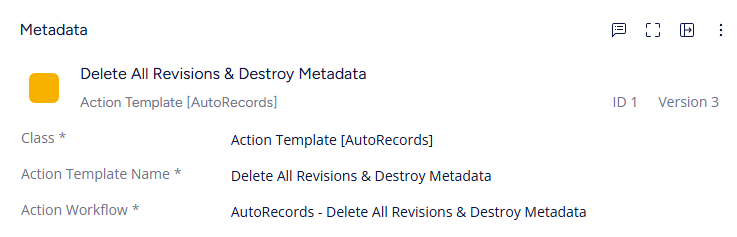
In this example, the Action will go into a workflow that will Delete All Revisions & Destroy Metadata. This workflow could be extended to include additional states, automatically transition to those states and perform additional work such as removing related information from SalesForce or an ERP system.
Direct Actions
Direct Actions are a set of pre-defined Actions that work directly against a file or object on the system. They execute with less overhead and do not rely on M-Files workflow, however, they cannot be customized or extended.
Workflow Actions
Workflow Actions are implemented as workflows in M-Files which contain a single Workflow state with a Vault Extension Method called in its VBScript action. These Actions can be extended or reused in customized Action workflows with new states added to the workflow. This allows AutoRecords to be easily tailored to perform virtually anything via scripting and additional workflow states. If the Records Manager is using Workflow Actions AutoRecords will create an Action object on the system and send that object through workflow on behalf of the object that's under retention. This preserves any existing workflow state that may exist for the object under retention. The list of properties in the Copy Properties To Action specified on the Policy will be copied from the object under retention to the Action object so the Records Manager can easily create custom workflows which reference properties from the original object. Importantly, the Action object will also reference the original object so there will be visibility on the Action
Actions Available
The list of Actions below comes with AutoRecords. Each Action indicates whether it is available as a Workflow Action or as Both Workflow and a Direct Action.
Assign to Author (workflow)- Creates an assignment for the object which gets assigned to the object's Created By property
Assign to Owner (workflow)- Creates an assignment for the object which gets assigned to the Retention Category Owner who is specified on the Retention Category.
Assign To Policy Owner (workflow)- Creates an assignment for the object which gets assigned to the Policy Owner who is specified on the Policy.
Delete All Revisions & Destroy Metadata (both)- Uses the M-Files Destroy method to permanently delete all revisions of the object and its metadata
Destroy File Versions (both)- Iterates through past versions of the object deleting all where File Version is less than or equal to the difference between File Version on the most recent version and the File Versions Exceeding property from the trigger. An Event using this action must also be using a File Version Trigger. Unlike other actions above, this action will continue to fire on its Event's Period. When Action Date + Period <= Today's Date, the Action will trigger again destroying the appropriate old File Versions and updating the Action Date.
Flag As Obsolete (both)- Set the Obsolete Date property on the object to the current date
Restrict Access to RMs (both)- Assigns a Named Access Control List to the object limiting access to users in the Records Managers group
Set Deleted Flag (both)- Deletes the object in M-Files which sets a flag to not show the object in search results without setting a Deleted flag (requires permissions)
Set Archive Flag (both)- Calls the out of the box M-Files method to mark the object for archiving
Vital Review (workflow)- Creates an assignment for the object assigned to the Retention Category Vital Reviewer who is specified on the Retention Category.
Administrators may add additional custom Action Workflows but care must be taken to understand how AutoRecords references objects within workflow.
Actions
AutoRecords creates Actions for everything it does in the system. There additional properties that on the Action object:
Action Name- Automatically populated from the Action Template.
Action Workflow- Populated from the Action Template.
Event- The Event object that caused the creation of this Action.
Action Logging- A user readable message for what the action did. Different for each Action Template.
Action Date- A timestamp of when the Action last fired.
Actions are automatically removed from the system based on the number of days specified on the Event Template. Actions will only be removed once they are older than the days specified on the Event Template.