Retention Categories
Retention Categories are created as objects in M-Files and determine the Events to be scheduled for each document or object that is assigned to this category of retention. In other words, a Retention Category determines what will be done. Multiple Events can be scheduled for a single Retention Category. For example by selecting multiple Event Templates we can schedule a review at 6 months, then restrict access to records managers after a year and finally delete after 5 years.
Retention Categories are used to link M-Files objects to the Event Templates and assign business related label and category names. An M-Files object can only ever be assigned to a single Retention Category. A Retention Category consists of the following.
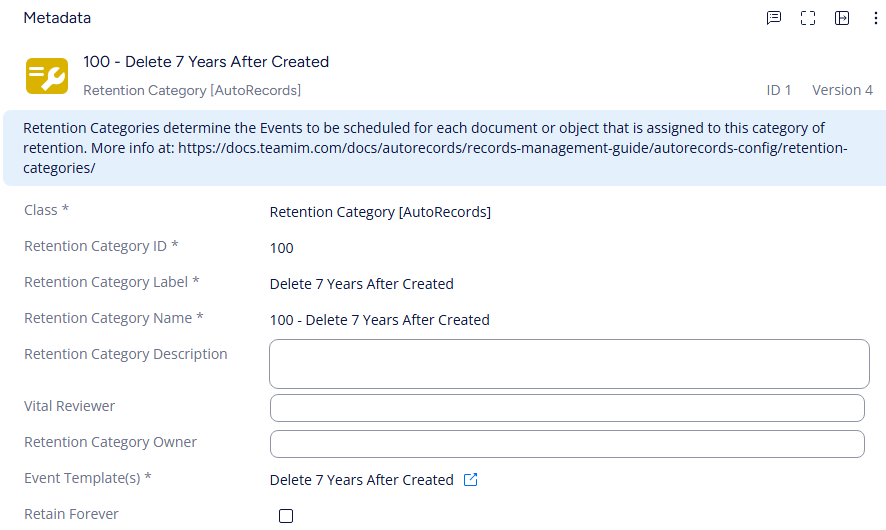
ID: Custom integer for internal identification
Label: Free text label for the Category
Name: Automatic concatenation of "ID - Label"
Description: Free text description for the Category
Vital Reviewer: M-Files User that will be assigned for Vital Review of objects if the Category utilizes the Vital Review Action.
Owner: The M-Files User that "owns" this Retention Category and will be assigned for reviews of objects if the Category utilizes an Event which performs the Assign to Owner Action.
Event Template(s): The Event Template(s) that will be used when creating Events for objects in this Category. Multiple Event Templates can be selected and all Events will be processed together. This allows a single Event to create multiple Actions in the system. For example multiple assignments may be made for end users to set statuses and dates which may trigger other Events. In this way it is fairly simple to create an Approve & Delete process by creating an Assignment which updates a status flag that in turn triggers the Delete.
You cannot change the event templates on a retention category. In cases where a change must be made, a new retention category needs to be created, and the old retention category may then be phased out. This ensures that all scheduled events occur and compliance is met, guaranteeing correct and proper handling of documents.
Retain Forever When a retention category is set up to keep items forever, use the Retain Forever option. Once the option is selected there is no longer a need to specify an Event Template since no events will be scheduled for those objects.