Policies & Policy Groups
Overview Policies & Policy Groups eliminate the need for end users or records managers to assign retention manually to individual documents and objects. The Policy/Policy Group determines which documents and objects should be included for the purposes of retention and then AutoRecords automatically assigns a Retention Category to those objects based on their class and Policy Filters. Policies/Policy Groups always include a class or classes and optionally a Policy Filter which further refines the number of objects from those classes that qualify to be included. Policy Filters use metadata comparisons (aka Triggers) to refine which documents or objects should be included. The Policy Filters are applied to ALL classes in the Policy/Policy Group. If a class is missing metadata used by the Policy Filter criteria, nothing from that class will be included. A separate Policy/Policy Group should be created for classes that have metadata that don't meet the Policy Filter criteria.
Important: Policy Groups may require special reviews and internal processes. Please refer to the documentation for Policy Groups operations for more information.
Policies
The concept of a Policy is that it determines what category of retention a file or object belongs to and AutoRecords will automatically update the file or object with metadata to indicate the Policy and Retention Category that it belongs to. This provides tremendous visibility to retention information for Records Managers and allows the use of M-Files features like security and Views which can leverage the Policy information. Since retention information is stored with each file/object, the first time AutoRecords runs or when there are dramatic changes in Policies, it can take M-Files many hours to process all of the updates that AutoRecords performs. Policy Groups do not require M-Files to update each File/Object under retention and execute faster if performance is a primary concern.
The Policy is an object created in M-Files to identify which classes of objects/documents are to be included and which category of retention is to be assigned.
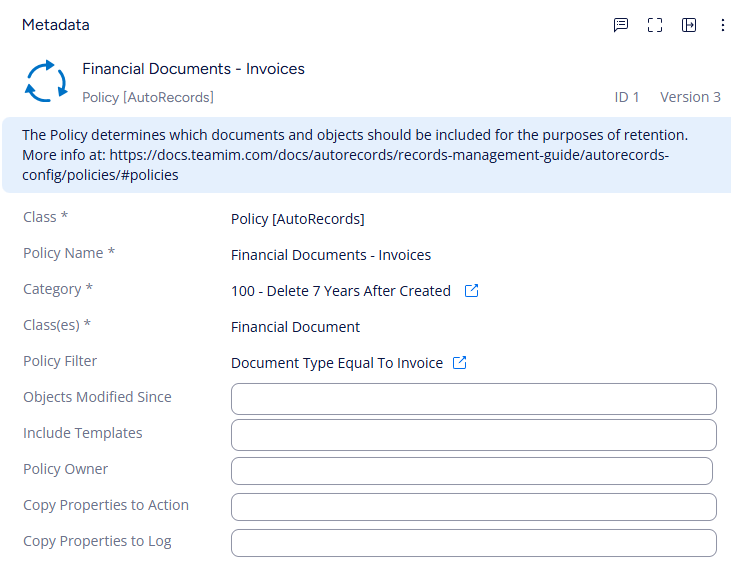
Policy Name: Text field that is used to describe the rule. This can be any value and is manually entered.
Category: The Retention Category, will be assigned to all documents and objects that qualify for this Policy based on the Class and Filter defined. Based on the Retention Category, AutoRecords will schedule retention Events for all documents or objects in this Policy. A Retention Category is selected from the list of existing Retention Categories that the user has permission to.
Class(es): One or more classes of objects that can be assigned the Retention Category. Classes are required, and at least one Class must be specified. Each Class specified will be eligible to have the Retention Category associated to the Policy assigned to the documents belonging to that class. This can be thought of as a logical "OR" so if multiple classes are specified, documents meeting any of the classes specified qualify for the policy. (i.e."If the class of the document is Class1 or Class2 or Class3.") If no Policy Filters are specified, all documents/objects belonging to the Class(es) specified will get assigned the Retention Category designated.
Policy Filter: Policy Filters can be configured so documents or objects matching the filter conditions will be eligible to have the Retention Category assigned. Policy Filters are not required. Each Policy Filter specified by this property further limits the eligibility of documents or objects that will qualify for the Policy. This can be thought of as a logical "AND" condition. "If Policy Filter A AND Policy Filter B AND Policy Filter C."
Metadata that affects any part of the document lifecycle should NOT go in the Policy Filter. The Policy determines what to include and those documents or objects should be included in the Policy throughout their lifecycle. A Policy should NOT be used to "declare a record" or determine WHEN something gets included. The Event Template is used to determine "when" something becomes a record. For example we should set up a Policy that includes all invoices even if we declare it a record and retention is only calculated after the invoice gets paid. The Date Paid should be part of the Event Template rather than the Policy. This insures all Invoices get assigned the correct Policy and are assigned the correct Retention Category prior to declaring a record or calculating retention. It also makes creating Views showing Invoices at various stages of retention possible. Once the invoice is paid the Event Template will determine what to do with it, but in general documents and objects should always stays in the same Policy from the time they're created until the time they're destroyed.
Policy Filters use the same object as Triggers since technically a Trigger is just a filter as well. So anything that's set up as a Policy Filter can be used as a Trigger and anything set up as a Trigger can be used as a Policy Filter.
Objects Modified Since: Date field that indicates how far back in time AutoRecords should apply the rule. This allows Records Managers to create a new rule that won't impact existing content on the system or optionally exclude files created before a certain date.
Include Templates: Templates are a special construct in M-Files. Templates have the Is Template flag set and in many cases a Template should not be included in standard retention policies because they are meant to remain on the system to be used in creation of new documents. The default value for this field is No.
If Retention is applied to a Document Template, documents derived from that Template will appear to inherit retention from the Template as documents are created. This is the default M-Files behavior. However, Policies will override the retention assigned to documents created from a template based on the properties on the document.
Policy Owner The Policy Owner is used when the Assign To Policy Owner Action is associated with an Event Template. The Policy Owner can be useful if you want certain people within the organization to be assigned to review all documents belonging to a policy.
It can be tempting to want to assign documents to people within the organization without realizing that doing so may create a significant amount of extra work and "noise" for them. Please reach out to TeamIM and we can discuss alternatives that may be a better fit.
Copy Properties To Action Lists the properties that will be copied from the object or file with retention to the Action Object that AutoRecords uses for workflow Actions. Any properties specified here that do not exist on the file or object under retention will be ignored.
Copy Properties To Log Lists the properties that will be copied from the object or file with retention to the Disposition Log's metadata section. These properties will appear in both the raw data and the formatted disposition report.
Copying properties from a retentioned object to a log file should be scrutinized carefully since the file may be deleted but information about that file is now contained in a log file beyond the disposition date making it discoverable in legal cases.
Policy Groups
Policy Groups share many of the same settings as shown above, however they are an entirely different way of thinking about retention. A Policy Group stores all retention information for all files that qualify for the Policy in a Policy Group File(s) attached to the Policy Group. The number of files/objects permitted within a Policy Group File is controlled by the Policy Group File Maximum Row Count setting in the Admin Utility.
When Policy Groups execute, they collect all eligibile files and objects based on the Policy Group Classes and Policy Filters and then AutoRecords calculates retention for those files and stores the retention information as rows of data in the Policy Group File.
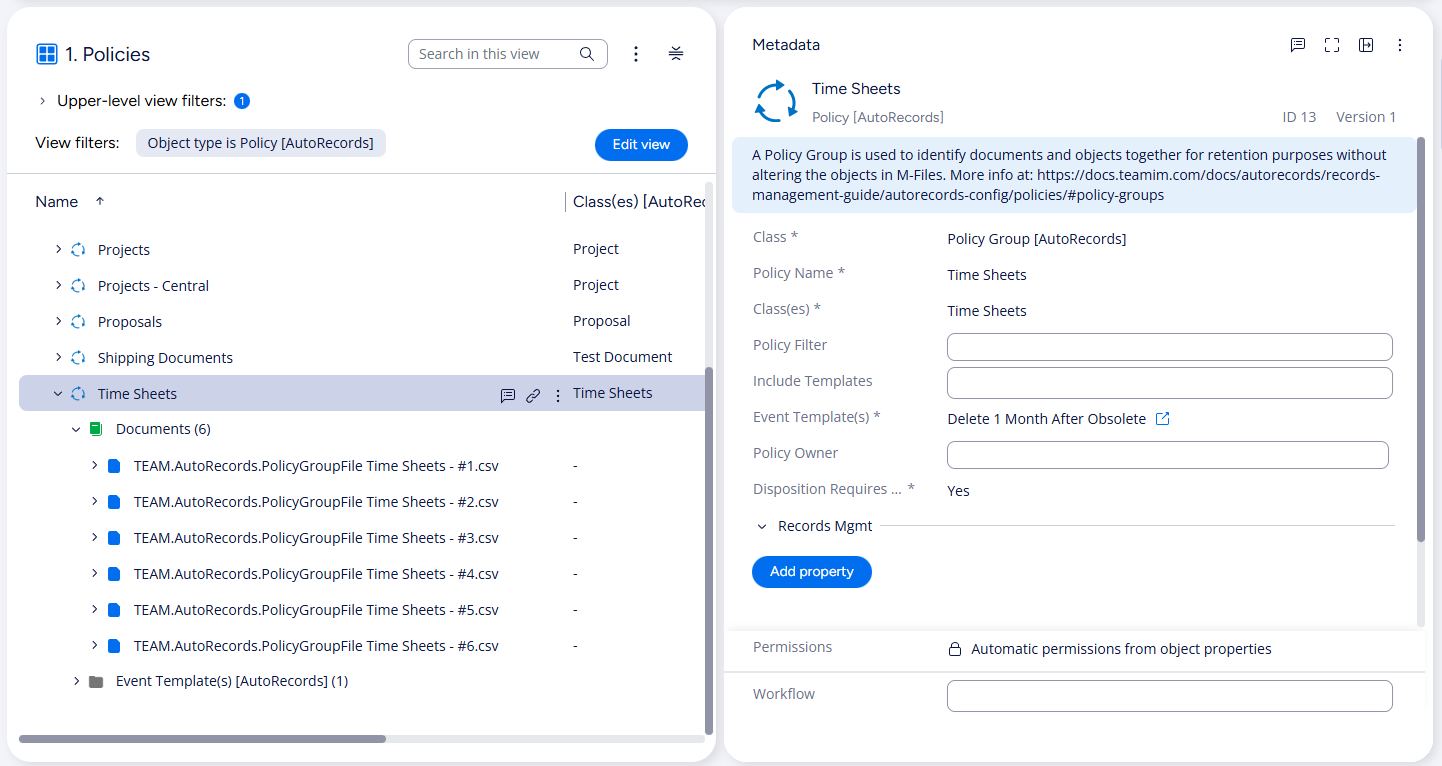
Policy Groups contain the same metadata as a Policy, except the Retention Category is replaced with an Event Template and there's a flag to indicate whether Disposition Requires Approval.
Event Template: This is the Event Template that should be used to schedule Events for all documents that qualify for this Policy Group. Only one Event Template can be specified and the Event Template cannot contain actions to Destroy File Versions, Assign to Owner (Assign To Policy Owner is allowed), or perform Vital Review.
Disposition Requires Approval: Policy Groups have the concept of an Approval that is outside of the M-Files assignment/approval model. This is a column within the list of files which allows someone to enter the person who approved the disposition and the date of the approval. If this setting is Yes, then the approval columns are blank and must be filled in before the disposition associated to the row is executed. If this setting is No, those columns are filled in with "Automatic" and no additional approval is required.